Going far? Your family can see you've made it

Send your family one link and you don't have to remember to text. They can check where you are in any browser. Only people with your link can see you, and only for as long as you want.

Free, no ads. Private link that expires. Your family needs no app.

Someone's always waiting to hear from you

And you're on a plane, out of signal, or you simply forget to text.

You land in Bangkok at 2 a.m. their time

Mum won't sleep until she knows you've arrived. You're exhausted after the flight, and in the morning there are five messages: “Are you there yet? Is everything OK?”

The bus leaves at 3 p.m. and two people are missing

Forty people at the castle and the bus ready to go. The guide counts heads, two people aren't picking up, and nobody knows where to look.

Your child is coming back from a school trip

It's 10 p.m. and parents are waiting at the school gate. The bus is “about an hour away”, and the teacher is answering the same question for the thirtieth time.

A festival, five stages and an overloaded network

You said “meet by the stage”, but one of you still hasn't turned up. Calls don't connect, and texts arrive ten minutes late.

When it matters most

Trips, school outings and journeys home where someone would rather know where you are.

Travelling abroad

Your family knows you've arrived, even on the other side of the world

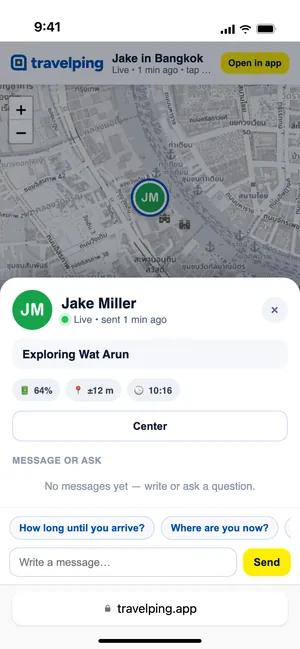
Before you fly to Thailand, Vietnam or Japan, send your family the link. They open it whenever they like and see where you are and when your last position came in. If you lose signal, they see your last known location, and the map updates by itself once you're back online. It works on roaming, a local SIM, an eSIM or hotel Wi‑Fi. On a long trip, pick “No limit” and updates every 15 min to save battery and data.

Browser: the traveller’s position on the map with the “Live” status and time of the last update
Tour guides and leaders

The whole group on one map, before anyone gets lost

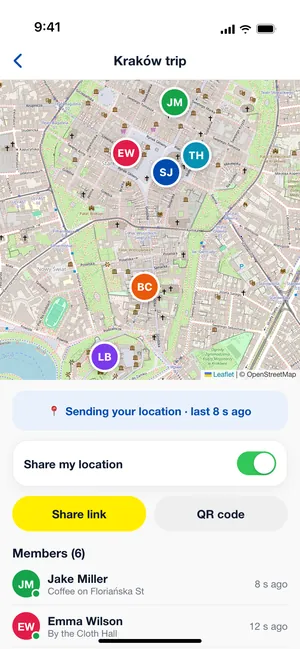
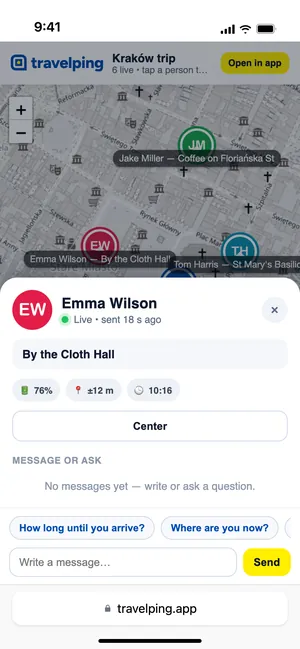
Create a group and show one QR code by the bus. Everyone who joins in the app is on the map with their name and a status, e.g. “Heading to Wawel”. Before the meeting time you can see if anyone has strayed too far.

App: the “Kraków trip” group map and member list
School trips and camps

Parents know where the bus with their children is

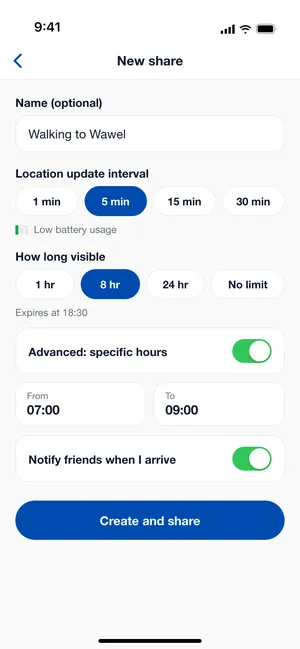
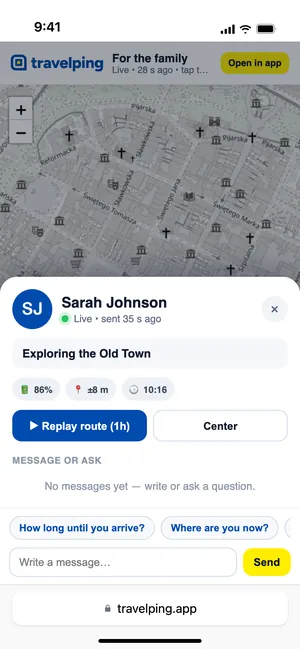
The teacher turns on sharing for the trip or the journey home, say for 8 hours, and posts the link in the parents' chat. Parents open it in a browser and don't need to message the teacher every hour.

App: a new share with 5 min updates and 8 hours of visibility
Festivals, conferences, events

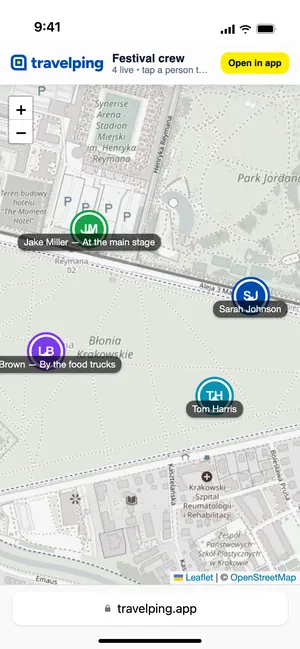
Find each other when calls won't connect

Friends or volunteers join a group by scanning a QR code. When the network is overloaded, the map still shows where each person was last and how many minutes ago.

Hotels and holiday reps

One QR code at reception for the whole day trip

The rep creates a group for the excursion and leaves the QR code at reception or on the bus. Guests join with one scan, no account needed, and the rep can see where everyone is before the bus leaves.

Family and friends

Someone waiting for you? They can see you're on your way

Catching the last train home, or getting picked up at the airport? Send the link to whoever is waiting and they'll see how far away you are. They can also ask “How long?” right from the map.

How it works

You set up the share in the app, and they follow it in a browser.

  1. Create a share

    Give it a name, then choose how often your position updates and how long it stays visible. No account needed.

    Every 1 min for a pickup, every 5 min day to day, every 15 min on a multi-day trip.

  2. Send the link or show the QR code

    Paste the link into WhatsApp, Messenger or a text message, or let someone scan the code from your screen.

    One QR code is enough for a whole group, for example at the meeting point before a trip.

  3. They see you on the map

    They open the link in a browser on a phone or computer. The map updates by itself, and they can message you in the chat.

    Works on Android, iPhone and desktop, with no app and no account.

  4. Pause or stop whenever you like

    With one tap you can pause sharing, change how long or at what hours you're visible, or delete the link.

    An expired or deleted link no longer shows your position.

Nothing for your family to install

Here's what it looks like on each side.

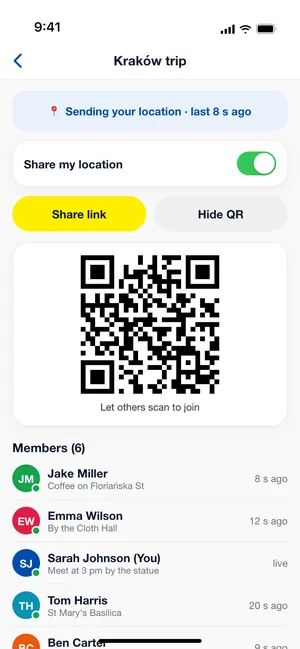
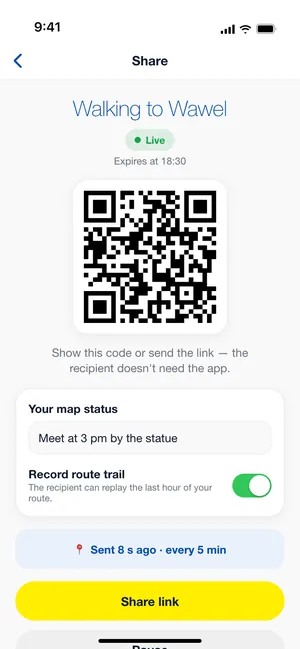
App: the share screen with a QR code

You get a link and a QR code straight away

Set it up once. Pause, edit or delete it whenever you like.

  • Updates every 1, 5, 15 or 30 min. Each option shows what it costs in battery.
  • Visible for 1, 8 or 24 hours, or with no limit. The expiry time is always on screen.
  • Send the link in any messenger or by text, or show the QR code.
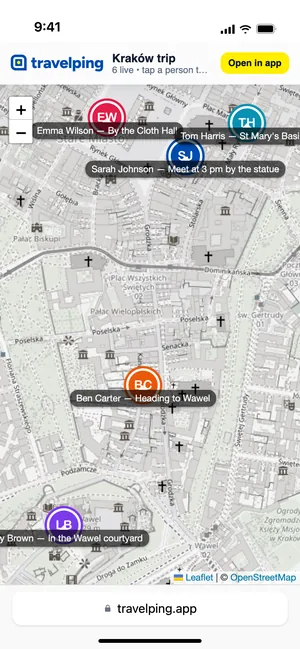
Browser: a person's card on the map with a message field

All they need is a link and a browser

The map opens on a phone or a computer.

  • No app, no account, no login.
  • The map refreshes by itself and shows when the last position arrived, e.g. “sent 8 s ago”.
  • They can message you straight from the map.
App: the group map and member list

One QR code for the whole group

For a tour, a camp, a festival or a hotel. Print the code and put it up on the bus or at reception.

  • People who scan it and join in the app appear on the shared map.
  • Opening the code in a browser shows the group without adding you to it.
  • Everyone starts and pauses their own sharing.

You decide how long you're visible

Your position is only sent while a share is active. We delete location history after 7 days. We don't sell data, and there are no ads.

Privacy Policy

Visibility time

1, 8 or 24 hours. The app tells you when it ends, e.g. “Expires at 18:30”.

Specific hours

You're only visible during the window you set, e.g. every day 7:00–9:00 on your commute.

Pause

One tap and nobody sees your position. “Resume sharing” turns it back on.

Delete share

The link stops working immediately, even for someone who has it open right now.

Frequently asked questions

Does my family need the app?

No. A browser is enough: Safari, Chrome, Firefox or any other. Only the person sharing their location needs the app.

How will they know I've arrived?

They see on the map where you are and when your last position came in, so you don't have to remember to text. If one of them has the app and has saved your share, you can also set a destination (“Notify friends when I arrive”), and they get a notification when you get there.

Does it work abroad, e.g. in Asia?

Yes, anywhere your phone has internet: roaming, a local SIM, an eSIM or Wi‑Fi. Your family back home opens the link in a browser. If you lose signal for a while, they see your last position and when it was sent, e.g. “sent 12 min ago”, and the map updates by itself once you are back online.

How can I see where my child is on a school trip?

The easiest way is for the teacher to share their location for the trip, or to create a group and post the link in the parents' chat. Parents open it in a browser, with no app and no account. An older child with their own phone can also send you a link. Location is only sent from a phone where someone has turned sharing on themselves, never in secret.

Will TravelPing call for help in an emergency?

No. It isn't an emergency app: there is no SOS button, and it doesn't contact emergency services. It helps the people close to you know where you are. In an emergency, call the local emergency number (112 anywhere in the EU).

Does it drain the battery?

Not much. Your position is sent every 1, 5, 15 or 30 minutes, and for each option the app shows the battery impact. 5 minutes is enough day to day, 15 or 30 for a multi-day trip.

What if I forget to turn it off?

Set a visibility time: after 1, 8 or 24 hours the share expires by itself. Only the “No limit” option keeps running until you pause or delete it.

Who can see my location?

Only people who have your link or QR code, and members of your group. The link can't be guessed, and it stops working once you delete the share.

How much does it cost?

Nothing. The app is free, with no ads and no paid features.

Does it work on iPhone and Android?

Yes. The app is available for iOS and Android, and one group can mix both. The recipient can use any phone or computer.

How many people can be in a group?

We don't set a member limit. Anyone who scans the group's QR code or gets its link can join.

Do I need to create an account?

No. After installing, the app works in guest mode. You can add an account with an email address later in your profile.

How do I delete my account and data?

In the app: Profile → “Delete account and data”. We delete your account, shares, groups and stored positions. See the Data deletion page for details.

A question or an idea?Email us: [email protected]